
Table of Contents
- Why Your Home Should Work as Hard as You Do
- The 3 Pillars of Modern Home Decor for Busy Professionals
- 5 Decor Upgrades That Save You Hours Each Week
- How to Build a Minimalist Home Office Setup That Boosts Focus
- Incorporate Smart Home Automation Essentials for Instant Calm
- Modern Home Organization Hacks for High-Traffic Areas
- The Psychology of Productivity: Design for Your Brain
- What to Skip: Bad Advice That Wastes Your Time
- Frequently Asked Questions
Last Updated: September 8, 2026
Why Your Home Should Work as Hard as You Do
Your home should be where you recharge, yet for many busy professionals, it has become a source of visual noise and mental clutter. Modern home decor for busy professionals isn't about chasing trends; it's about creating a sanctuary that reduces friction in your daily routine.
The core shift is moving from decor as pure aesthetics to decor as a functional tool. This guide covers five upgrades that save you hours each week, a minimalist home office setup that boosts focus, and the psychology behind why your physical space impacts your productivity.
The 3 Pillars of Modern Home Decor for Busy Professionals
Forget the idea that a beautiful home requires constant upkeep. The most effective modern home decor for busy professionals rests on three pillars: minimalism, functionality, and smart technology.
Minimalist Design Principles That Actually Stick
Minimalism is not about living with nothing; it's about living with intention. The principle that sticks for busy people is "clutter-free surfaces." If a surface is empty, it takes zero time to clean. Adopt a rule where every item on your counter, desk, or coffee table has a designated home.
Functional Design: Style Meets Daily Use
Functional design means every piece earns its place by serving a purpose. A beautiful ceramic bowl that holds your keys, wallet, and sunglasses by the door is essential. When selecting furniture, ask if the item simplifies a daily task.
5 Decor Upgrades That Save You Hours Each Week
These aren't just stylish additions; they are strategic investments in your most valuable asset: time. Each upgrade addresses a specific daily friction point, reclaiming minutes that add up to hours.
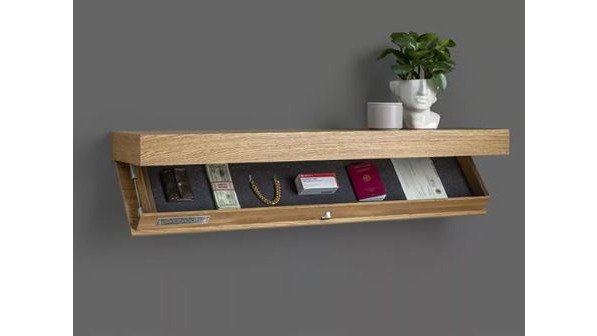
1. The Secret Storage Wall Shelf: Your New Command Center
Visible clutter is a constant drain on your attention. The Secret Storage Wall Shelf hides your valuables, documents, and tech in plain sight with a sleek, modern design and a discreet compartment. At $39.99, it eliminates the need for bulky filing cabinets, turning a blank wall into a command center.
2. Clear Airtight Storage Bins: A Pantry That Stays Organized
How much time do you waste searching for ingredients or throwing away stale snacks? The Clear airtight storage bins from Velora offer a moisture-proof seal that keeps food fresh up to three times longer. Because they are transparent, you can see what you have at a glance. Priced at $49.99, this simplifies meal prep and grocery shopping.
3. The Portable Small Projector: Instant Home Theater
Going out to the movies is a time commitment. The Portable Small Projector turns any blank wall into an entertainment hub in under a minute. This 720p device is compact enough to move from room to room or take to a friend's house. For $79.99, you gain an instant home theater or a large-screen display for presentations.

4. The UV Toothbrush Sanitizer: Effortless Morning Routine
Your morning routine should be automatic, not a series of decisions. The UV Toothbrush Sanitizer uses UV light to eliminate up to 99.9% of germs on your toothbrush, a task you would never remember to do manually. Priced at $29.99, it is a set-and-forget solution.

5. The Women's Insulated Lunch Bag: Your Daily Carryall
The $15 daily lunch purchase adds up to thousands of dollars a year. The Women's Insulated Lunch Bag features a spacious compartment for food and extra storage for a laptop or tablet, effectively replacing a separate work bag. For $29.99, it simplifies your commute while saving money.

How to Build a Minimalist Home Office Setup That Boosts Focus
A minimalist home office setup is critical for work-life balance, especially when your office is just a corner of your living space. The goal is a dedicated zone that signals "work mode" to your brain and then disappears when you clock out. Start with a clean desk holding only your monitor, keyboard, and a single notepad.
Total Time: 2-3 hours Difficulty: Beginner
- Clear the Desk: Remove everything except your essential tech.
- Hide the Cables: Use clips or a sleeve to route wires out of sight.
- Add Task Lighting: Position a desk lamp to illuminate your work area, reducing eye strain.
- Define the Space: Use a room divider or a distinct rug to mentally separate work from relaxation areas.
- Curate Wall Decor: Hang one piece of art or a vision board that inspires you without causing distraction.
Incorporate Smart Home Automation Essentials for Instant Calm
Generic advice about smart plugs and thermostats barely scratches the surface. For busy professionals, the real value lies in integrating technology so seamlessly that it enhances your home's aesthetic rather than cluttering it.
The Aesthetic Problem with Most Smart Homes
Most smart home devices are designed by engineers, not interior designers. A white plastic hub with a glowing LED ring or a chunky smart plug can ruin a curated space. The goal is to hide the technology while making the automation invisible.
The Foundation: Choose a Protocol, Not Just Products
Before buying anything, decide on your wireless protocol. The two main contenders in the U.S. market are Wi-Fi and Z-Wave/Zigbee (often via a hub like Hubitat or Home Assistant).
- Wi-Fi Devices: These connect directly to your router. They are the easiest to set up, no hub required, and are ideal for standalone items like a smart plug for your coffee maker. The downside: they can congest your network, and if your internet goes down, they often become dumb.
- Z-Wave/Zigbee Devices: These create a local mesh network, which is more reliable and secure. They require a hub, which adds an initial setup cost and a layer of complexity. However, they continue to function even if your internet connection drops.
For a busy professional who values reliability, a hybrid approach often works best: use Wi-Fi for simple, standalone automations and a hub-based system for complex routines.
The 'Invisible' Setup: A Step-by-Step Approach
Here is a practical, aesthetic-first approach to automating your space.
1. Start with Lighting, But Skip the Smart Bulbs
Smart bulbs are a common first purchase, but they often look like normal bulbs when off and can cast an unflattering light. A better approach is to install a smart dimmer switch (like those from Lutron Caseta or Leviton) that replaces your existing wall switch. It looks like a standard, premium switch, yet it gives you app control, scheduling, and voice control.
2. Hide the Hub and the Cables
If you need a hub, don't leave it on a shelf. Mount it behind your TV, inside a media console, or in a closet. Use a short, high-quality Ethernet cable to connect it to your router. For any device that must be visible, use cable clips and sleeves to route wires flush against the wall or furniture.
3. Use Sensors for 'Set and Forget' Automation
Sensors are the secret to a truly low-maintenance smart home. Instead of telling your lights to turn off, let a sensor do it for you.
- Motion Sensors: Place one in your entryway or hallway. The light turns on when you walk in with groceries and turns off automatically after two minutes of no motion. This eliminates the 'did I leave the light on?' question entirely.
- Contact Sensors: Attach one to your closet door or pantry. You can automate a small LED strip to turn on when the door opens, providing task lighting exactly where you need it, without fumbling for a switch.
4. The 'Good Morning' and 'Good Night' Routines
Spend 30 minutes setting up two core routines in your chosen app (Apple Home, Google Home, or Alexa).
- Good Morning (7:00 AM): The bedroom lights gradually fade on to 30% brightness, your smart thermostat adjusts to your daytime temperature, and your coffee maker (plugged into a smart plug) starts brewing.
- Good Night (10:30 PM): All lights turn off, the doors lock, the thermostat drops to your sleeping temperature, and a white noise machine (if you use one) turns on.
These routines are the 'set and forget' mechanisms that save you from making dozens of micro-decisions every day.
The Trade-Off: Convenience vs. Complexity
A fully integrated smart home system requires an afternoon to set up and a basic understanding of networking. If you are not comfortable with technology, start with one or two Wi-Fi devices. The goal is not to automate everything, but to automate the few repetitive tasks that cause the most friction.
Modern Home Organization Hacks for High-Traffic Areas
High-traffic areas like the entryway and kitchen are where clutter accumulates fastest. The key modern home organization hacks for these zones rely on the "one-minute rule" and designated drop zones. If a task takes less than one minute, do it immediately.
| High-Traffic Zone | Common Clutter | The Hack | Time Saved |
|---|---|---|---|
| Entryway | Shoes, keys, mail | Install a wall-mounted shelf with a hidden compartment | 10 min/day |
| Kitchen Counter | Appliances, papers | Use clear airtight bins to consolidate snacks and staples | 15 min/day |
| Living Room | Blankets, remotes | Designate a single decorative basket for all remotes | 5 min/day |
| Bathroom | Toiletries, hair tools | Keep only daily-use items on the counter; store the rest | 10 min/day |
The Psychology of Productivity: Design for Your Brain
Most decor articles tell you to 'reduce clutter' without explaining why it matters neurologically. For busy professionals, understanding the mechanism behind design choices turns a space from merely attractive into a genuine performance tool.
The Cognitive Cost of Visual Noise
Human attention is a finite resource. Every object in your visual field competes for cognitive processing power, even if you are not consciously aware of it. This is known as directed attention fatigue (the NIH). When your brain constantly inhibits irrelevant stimuli, like a pile of mail, it depletes the resource you need for deep work.
Research shows that individuals working in a visually cluttered environment report higher stress and lower persistence on tasks than those in a tidy space (apa.org).
The 'Three-Zone' Visual Hierarchy
To design for your brain, you need to control what it processes. A practical framework is the Three-Zone Visual Hierarchy:
- The Focus Zone (0-3 feet from your line of sight): This is your desk surface or your immediate workspace. It should contain only the task at hand. If you are working on a report, the only items should be your monitor, keyboard, mouse, and a single notepad. Everything else is visual noise.
- The Peripheral Zone (3-10 feet): This area should be visually calm. Use closed storage for items you need but do not need to see. A neutral wall color or a single piece of large-format art can anchor the space without demanding attention.
- The Ambient Zone (beyond 10 feet): This is where you can introduce texture and personality. A plant, a bookshelf with a few curated objects, or a textured rug can add warmth without interfering with your cognitive load.
Color Psychology: Beyond 'Calm' and 'Neutral'
Most advice stops at 'use calming colors like blue and green.' The deeper principle is about saturation and contrast, not just hue.
- High-Saturation Colors (bright reds, oranges) increase physiological arousal and heart rate. They are excellent for a workout area but counterproductive for a home office.
- Low-Saturation Colors (muted tones, pastels, earth tones) are less stimulating. They allow your brain to disengage from the environment and focus on the task.
- Contrast Ratio matters more than the specific color. A high-contrast environment (e.g., a white desk with a black monitor) creates strong visual boundaries that help your brain segment tasks. A low-contrast environment (e.g., a beige desk with a beige wall) can feel calming but may also reduce alertness.
The 'Closure' Principle for End-of-Day Transition
One of the most powerful psychological tools is the Zeigarnik Effect: the tendency to remember incomplete tasks better than completed ones. This is why you cannot 'switch off' from work when your laptop is still open on the dining table.
To design for your brain, you need a physical 'closure ritual.' This is not just about tidying; it is about creating a visual signal that the workday is over.
- The Laptop Drawer: Store your laptop in a drawer or cabinet at the end of the day. The physical act of closing the drawer signals 'task complete' to your brain.
- The Paper Tray: Have a single tray for 'active' documents. When you are done, file them away or place them in the tray and cover it. The act of covering signals that the task is paused, not active.
- The Lighting Shift: Change the color temperature of your lights in the evening. Brighter, cooler light (5000K) suppresses melatonin and promotes alertness (the CDC). Warmer, dimmer light (2700K) in the evening signals to your brain that it is time to wind down.
The 'One-Object' Rule for Display Surfaces
For surfaces like coffee tables and nightstands, adopt the 'one-object' rule: each surface has a maximum of one decorative object plus one functional object. This constraint forces you to curate rather than accumulate.
What to Skip: Bad Advice That Wastes Your Time
Not all decor advice is worth following when you are short on time. Many trends prioritize looks over livability. Here is what to skip:
- Trendy, High-Maintenance Materials: White velvet sofas or brass fixtures that tarnish quickly will add to your to-do list, not reduce it.
- Open Shelving in the Kitchen: While it looks airy, it requires perfectly organized dishes and constant dusting. Closed cabinets are more forgiving.
- Complex DIY Projects: A project that takes three weekends to complete will likely leave you with a half-finished space and a lot of stress.
- Overly Thematic Decor: A room that is a "theme" rather than a reflection of your life feels dated quickly and requires constant updating.
Designing a home that supports your busy lifestyle is about making intentional choices that save you time and mental energy. You don't need to overhaul everything at once; start with one high-traffic area or one time-saving upgrade. Velora offers a curated selection of affordable solutions, from the Secret Storage Wall Shelf to the Clear airtight storage bins. Get started with Velora and turn your home into the low-maintenance sanctuary you deserve.
Frequently Asked Questions
What is the most popular home decor right now?
For busy professionals, the focus has shifted from purely visual trends to functional minimalism. This means clean lines, neutral palettes, and multi-functional furniture that reduces visual noise. Popular items include secret storage shelves that hide clutter, smart lighting that adjusts automatically, and modular pieces that adapt to changing needs. The goal is a curated, sophisticated look that supports productivity and feels like a sanctuary, not just a showroom.
How can I make my home look modern on a budget?
Start by decluttering high-traffic areas. Invest in a few key organizational pieces like clear airtight storage bins, which cost around $49.99, to instantly create a clean, unified look. Then, focus on lighting: a simple, warm floor lamp can change a room's feel more than any new furniture. You don't need a full renovation. Prioritize functional design and a neutral palette to achieve a modern aesthetic without a designer price tag.
What are the best low-maintenance home decor items for busy people?
Look for items that do double duty. A UV toothbrush sanitizer ($29.99) eliminates a daily hygiene task, while a portable projector ($79.99) replaces a bulky TV setup. For organization, a designer shelf with a secret compartment ($39.99) provides storage without looking like clutter. The core principle is to choose durable, easy-to-clean materials and tech-integrated decor that automates small tasks, giving you more free time.
How do I create a minimalist home office setup if I have limited space?
Focus on a 'less but better' approach. Start with a clean desk, an ergonomic chair, and one focal point, like a piece of art. Use a wall shelf to keep supplies off your desk. Add task lighting to define the workspace. The key is spatial planning: ensure everything has a home, and use a neutral palette to keep the area calm and free from distractions, which is crucial for focus and work-life balance.