
Table of Contents
- The 8 Home Office Productivity Gadgets Worth Your Money
- Quick Comparison: Best Home Office Productivity Gadgets
- Lighting and Video: Look Sharp on Every Call
- Ergonomic Home Office Accessories for Long Work Hours
- Desk Organization Tools for Productivity and Focus
- Small-Space Tech: Projectors and Multi-Use Gear
- How to Optimize Home Office Setup Without the Clutter
- What to Skip: Gadgets That Waste Desk Space
- Frequently Asked Questions
Last Updated: September 6, 2026
The average professional loses hours each week to a poorly equipped workspace. Distractions, discomfort, and disorganization quietly chip away at focus, turning an eight-hour day into a twelve-hour grind. The right tools change that equation entirely, and the best gadgets for home office productivity tackle these friction points head-on rather than adding more screen time. In this Velora guide, we’ve curated the eight upgrades that deliver the most measurable impact on workflow efficiency, from lighting that makes you look sharp on calls to organization systems that clear your desk footprint.
Most lists of home office gear read like a catalog of everything you could possibly buy. Our approach is different. We’re cutting through the noise to focus on gadgets that solve specific, recurring problems: bad lighting, poor posture, desk clutter, and the constant shuffle of cables. If a product doesn’t save you time or reduce physical strain, it doesn’t make this list. Below, we’ll show you exactly how to optimize your setup without turning your space into a showroom.
The 8 Home Office Productivity Gadgets Worth Your Money
Home office productivity depends on reducing friction between you and your work. Every gadget on this list targets a specific bottleneck: visual fatigue, physical discomfort, or the mental load of a cluttered desk.
Quick Picks:
- Best for Video Calls: Magnetic Selfie Light, flattering, adjustable illumination for under $30
- Best for Small Spaces: Portable Small Projector, turns any wall into a second display
- Best for Focus: Stainless Steel Spinner Fidget Ring, subtle, wearable stress relief
- Best for Decluttering: Secret Storage Wall Shelf, hides valuables while displaying your setup
The common thread here is intentionality. A mechanical keyboard or ultrawide monitor might be nice, but they’re expensive and often unnecessary. These picks are affordable, targeted, and solve the specific pains of working from home. You can build a complete setup for under $200, which is a fraction of what a single premium peripheral costs.

Quick Comparison: Best Home Office Productivity Gadgets
Before we dig into the details, here’s a side-by-side look at how these tools stack up. This summary makes it easy to identify which gadget addresses your most pressing workspace issue.
| Gadget | Price | Primary Benefit | Best For |
|---|---|---|---|
| Magnetic Selfie Light | $29.99 | Flattering video lighting | Video calls and content creation |
| Magnetic Suction Cup Mount | $14.99 | Hands-free phone positioning | Recording and multi-tasking |
| Remote Control for Media | $19.99 | Wireless camera control | Content creators and presenters |
| Portable Small Projector | $79.99 | Large display without monitor | Small-space offices |
| Spinner Fidget Ring | $24.99 | Subtle stress and focus aid | Long meetings and deep work |
| Secret Storage Wall Shelf | $39.99 | Hidden desk organization | Decluttering and security |
| Airtight Storage Bins | $49.99 | Pantry and snack organization | Keeping snacks fresh nearby |
| Tap to Pay Magic Wand | $14.99 | Fun, contactless payments | Quick transactions and breaks |
This table gives you the at-a-glance view, but the real value is in the details. The next sections break down the top performers by category, explaining why they matter and how to use them effectively for home office productivity.
Lighting and Video: Look Sharp on Every Call
Your video presence is a professional signal. Poor lighting makes you look tired, distracted, or unprofessional, regardless of how well you’re performing. A dedicated fill light is the single most effective upgrade for video conferencing, and the Magnetic Selfie Light solves this elegantly.
This compact light attaches to your phone in about a second using MagSafe or the included sticky ring for non-magnetic cases. It weighs just 1.41 ounces, so it disappears into your pocket when not in use. The six lighting modes, ranging from white to warm to cold light with a color temperature span of 2500-9000K, let you adapt to any room’s ambient conditions (nist.gov). With a CRI above 95, colors appear true-to-life, which matters when you’re presenting products or yourself (energy.gov).
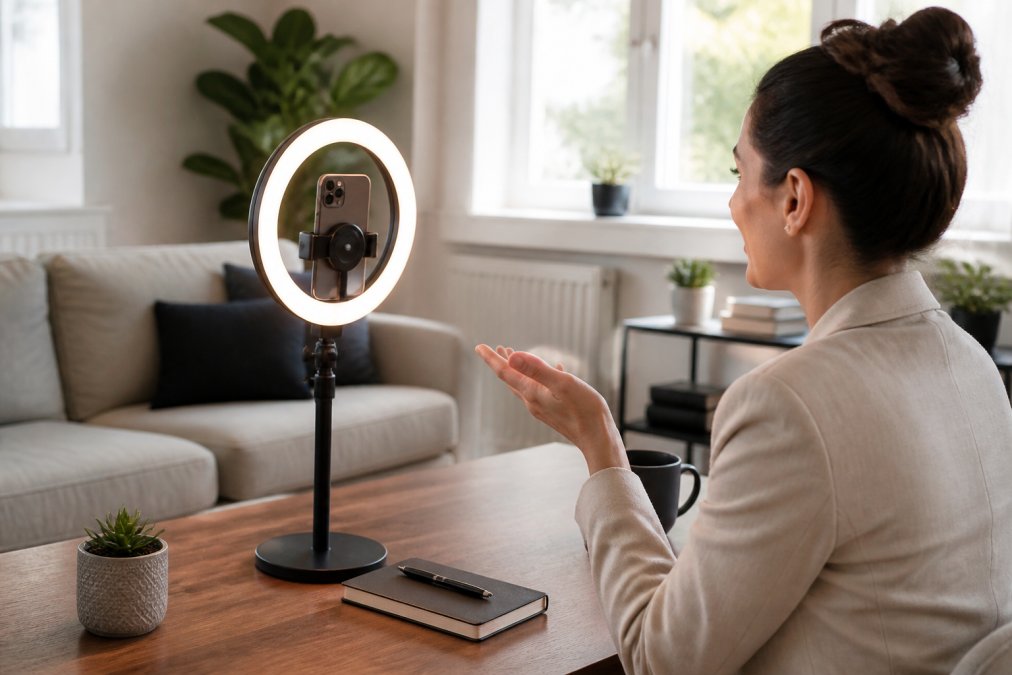
The 300mAh battery provides up to 30 minutes of continuous use on a full charge, which covers most calls. Type-C charging means you can top it up quickly between meetings. This is the kind of tool that instantly elevates your video quality without requiring any technical setup.
Ergonomic Home Office Accessories for Long Work Hours
Ergonomic home office accessories are about more than comfort; they’re about longevity. Sitting in a static position for hours strains your neck, shoulders, and lower back. While a sit-stand desk and an adjustable chair are the gold standard, not everyone has the budget or space for major furniture changes. Smaller accessories can bridge that gap effectively.
The Stainless Steel Spinner Fidget Ring is an unexpected but practical addition to your ergonomic toolkit. It provides a subtle outlet for restless energy that might otherwise lead you to shift constantly in your chair or reach for your phone. The spinning motion offers gentle haptic feedback that can help maintain focus during long meetings or deep work sessions. It’s a discreet tool that doesn’t draw attention, making it suitable for video calls where other fidget devices might be distracting.
A common mistake is ignoring the micro-breaks that your body needs. Even with the best chair, you need to stand, stretch, and change your visual focus every 30-45 minutes (the CDC). The fidget ring serves as a small reminder to stay present, but the real ergonomic win comes from pairing it with a regular movement schedule. Set a timer if you need to, and use the ring as a physical cue to check in with your posture.
Desk Organization Tools for Productivity and Focus
Desk clutter is a direct tax on your attention. Every loose cable, stray document, or misplaced pen requires a small amount of cognitive effort to work around. Desk organization tools for productivity don’t just make your space look better; they reduce the mental load that accumulates over a long workday.
The Secret Storage Wall Shelf is a smart solution for the dual problem of display and storage. It functions as a sleek, modern shelf for your books, plants, or tech, but it includes a cleverly concealed compartment. This hidden space is ideal for stashing valuables, personal items, or documents you don’t want sitting in plain view during a video call. It removes visual noise from your desk while keeping essentials within arm’s reach.
For the snacks and drinks that fuel your afternoon, the Clear Airtight Storage Bins keep everything fresh and visible. A moisture-proof, airtight seal preserves the texture of nuts, dried fruits, and whole grains, so your break-time fuel is always crisp. Keeping these bins on a shelf near your desk eliminates the excuse to wander into the kitchen and lose your focus flow.
Small-Space Tech: Projectors and Multi-Use Gear
Working from a small apartment or a shared room demands creative solutions. A full monitor setup isn’t always feasible when desk footprint is at a premium. Small-space tech focuses on multi-use gear that delivers big results without permanent installation.
The Portable Small Projector is the standout here. It projects a 720p image onto any blank wall, instantly giving you a second display for presentations, video calls, or reference documents. When you’re done, it packs away into a compact size, freeing up your desk completely. This is a far better use of space than a large monitor that dominates your work area.

The Magnetic Suction Cup Phone Mount complements this setup by freeing your hands. Its double-sided suction design uses 15 independent small suction cups to grip the back of your phone or case securely. You can attach it to a smooth wall, a glass cabinet, or even a mirror to position your phone for recording or as a secondary camera. It requires no adhesive, so you can move it between locations as your needs change.
This pairing creates a flexible workspace that adapts to your tasks. Need to record a quick video? Mount your phone and use the projector as a backdrop. Have a long call? Position the phone at eye level and use the projector for your notes. This level of adaptability is what truly defines an optimized small-space office.
How to Optimize Home Office Setup Without the Clutter
Learning how to optimize home office setup is less about buying more gear and more about creating a system. The goal is to reduce the number of decisions you make about your physical environment so you can focus on the work itself. Start by identifying the three biggest sources of friction in your current space.
First, address your connectivity and device synchronization. Ensure your peripherals, like the Bluetooth remote, are charged and paired before you sit down. The Remote Control for Cell Phone is a great example of a tool that simplifies a workflow. With Bluetooth v5.3 and up to 48 hours of continuous use, it lets you control your camera or scroll through content without touching your phone. This prevents the common trap of picking up your phone to adjust something and then getting lost in a notification.

Second, establish a home for everything. Use the storage solutions mentioned earlier to create a designated spot for your gear, snacks, and documents. When everything has a place, cleanup takes two minutes instead of twenty. This habit alone can save you a significant amount of time each week.
Third, focus on your audio and communication gear. Clear audio is just as important as clear video. A good microphone and noise-canceling headphones prevent miscommunication and reduce the fatigue of straining to hear colleagues. This is a non-negotiable investment for anyone spending more than a few hours a week on calls.
What to Skip: Gadgets That Waste Desk Space
Not every trending gadget deserves a spot on your desk. Many products create more problems than they solve, adding to desk clutter without meaningfully improving your workflow efficiency. Recognizing these traps is just as important as knowing which tools to buy.
Skip any single-purpose device that you’ll use less than once a week. That dedicated milk frother, that specialized cable organizer with a massive footprint, or that novelty desk toy will likely become a dust collector. If a gadget doesn’t serve a daily or near-daily function, it’s taking up valuable real estate.
Be wary of cheap wireless peripherals that promise convenience but deliver latency and connectivity headaches. A lagging mouse or keyboard is far more frustrating than a wired one. Hardware compatibility matters; ensure any new device works seamlessly with your operating system and primary software before you commit.
Finally, avoid the trap of buying gadgets for the sake of novelty. The 3D Printed Tap To Pay Magic Wand is a fun conversation starter, but it’s not a core productivity tool. It’s perfect for breaks or a quick trip to the coffee shop, but it won’t help you write a report or manage your inbox. Ask yourself if a purchase genuinely reduces friction or adds to the visual and mental noise of your space. If it’s the latter, give it a pass.
Building a productive home office is an ongoing process of refinement. The challenge is resisting the urge to over-equip your space. Start with the tools that address your most obvious pain points: better lighting for calls, a cleaner desk, and a more flexible setup for your square footage. Each of the gadgets we’ve highlighted is designed to solve a specific problem without adding complexity. At Velora, we curate products that genuinely enhance your daily routine, so you can spend less time managing your gear and more time doing your best work. Explore our collection of clever, affordable finds and build an office that works as hard as you do. Get started with Velora and simplify your setup today.
Frequently Asked Questions
What are the best gadgets for home office productivity?
The best gadgets for home office productivity focus on three areas: ergonomics, lighting, and organization. A magnetic phone light improves video call quality, while a suction cup mount frees your hands for demos. For long hours, prioritize ergonomic home office accessories like a fidget ring to manage stress. Desk organization tools for productivity, such as hidden storage shelves, reduce visual clutter. Start with the device that solves your biggest distraction, whether that is poor lighting or a messy desk.
Are desk gadgets worth the investment for productivity?
Yes, but only when they solve a specific problem. A gadget that eliminates a daily annoyance, like holding your phone for video calls, pays for itself in saved time. A $14.99 suction cup mount is cheaper than the time wasted on a shaky setup. However, avoid buying gear that just sits on your desk. Assess your workflow first. If you take frequent calls, a magnetic light is a clear win. If clutter is your issue, invest in desk organization tools for productivity instead.
What ergonomic gadgets help with long work hours?
Beyond standard chairs and keyboards, small tools make a difference. A stainless steel spinner fidget ring gives your hands a quiet outlet for restless energy during calls, helping you stay focused. Proper lighting is also ergonomic; a magnetic fill light with adjustable color temperature reduces eye strain. The key is to take breaks and move. Gadgets support posture and comfort, but they do not replace standing up, stretching, and looking away from your screen every 20 minutes.
How can I improve my home office setup for better focus?
Start by clearing your desk of non-essential items. Use desk organization tools for productivity, like a secret storage wall shelf, to keep supplies accessible but out of sight. Next, address your environment. Good lighting prevents eye fatigue, so add a task light or a phone fill light for calls. Finally, minimize distractions. Use a dedicated device for work and keep your phone out of reach unless you need it for calls, which is where a remote control and mount become useful.