
Table of Contents
- Quick Comparison: 7 Smart Home Solutions for Busy People
- How We Picked These Time-Saving Devices
- 1. Auto Mouse Mover: Stop Losing Time to Screen Locks
- 2. Automatic Stirring Cup: One Less Morning Task
- 3. Magnetic Phone Mount: Hands-Free Everywhere
- 4. Magnetic Selfie Light and Camera Remote: Faster Content and Calls
- 5. Airtight Storage Bins: Cut the Sunday Pantry Hunt
- 6. UV Toothbrush Sanitizer: Hygiene on Autopilot
- How to Set Up a Smart Home Office in One Afternoon
- Cost-Benefit: What an Hour of Your Time Is Worth
- Privacy and Maintenance for Non-Techies
- Frequently Asked Questions
Last Updated: September 11, 2026
Quick Comparison: 7 Smart Home Solutions for Busy People
This guide from Velora explores smart home solutions for busy people.
Each device fits a real workday, with costs and honest limitations. Picks range from a $14.99 phone mount to a $49.99 storage system, and every one targets a recurring annoyance rather than adding another app.
Most "best smart home" lists optimize for novelty. A device needing weekly troubleshooting costs more time than it saves, so we considered reliability and setup speed.
| Device | Price | Time Saved Weekly | Best For |
|---|---|---|---|
| Auto Mouse Mover | $24.99 | 1-2 hours | Remote workers, long downloads |
| Automatic Stirring Cup | $29.99 | 15-20 min | Morning coffee routines |
| Magnetic Phone Mount | $14.99 | 20-30 min | Video calls, hands-free viewing |
| Selfie Light + Camera Remote | $49.98 | 30-45 min | Content creators, calls |
| Airtight Storage Bins | $49.99 | 20-30 min | Meal prep, pantry organization |
| UV Toothbrush Sanitizer | $29.99 | 10-15 min | Bathroom routine simplification |
How We Picked These Time-Saving Devices
Three filters: setup under five minutes, no subscription, and a clear daily task eliminated. Devices needing an account, hub, or firmware update were cut.

A common mistake is buying automation that creates new work, a smart plug needing monthly re-pairing saves no one time. We prioritized plug-and-use designs with mechanical or single-button operation.
For a broader home office build-out, pick two or three devices that remove a task you repeat daily. That's the core of most smart home automation ideas for beginners, and it beats buying a full ecosystem on day one.
1. Auto Mouse Mover: Stop Losing Time to Screen Locks
Screen locks are the quietest time thief in remote work. The Auto Mouse Mover ($24.99) plugs in and moves the cursor at set intervals, so your machine never sleeps during long downloads, renders, or reading breaks.
Setup takes under a minute. Plug it in, and it runs. No app, no pairing, no account.
It earns its keep during large file exports or keeping a status dashboard live in a meeting. It only helps if you actually leave your desk.
2. Automatic Stirring Cup: One Less Morning Task
The Rechargeable Automatic Stirring Cup ($29.99) mixes your coffee or shake with a button press and keeps it warm, with a 304 food-grade stainless steel liner and leak-resistant design.
For daily protein shakes or iced coffee, it removes the spoon and the stirring: press the switch, get a full mix.
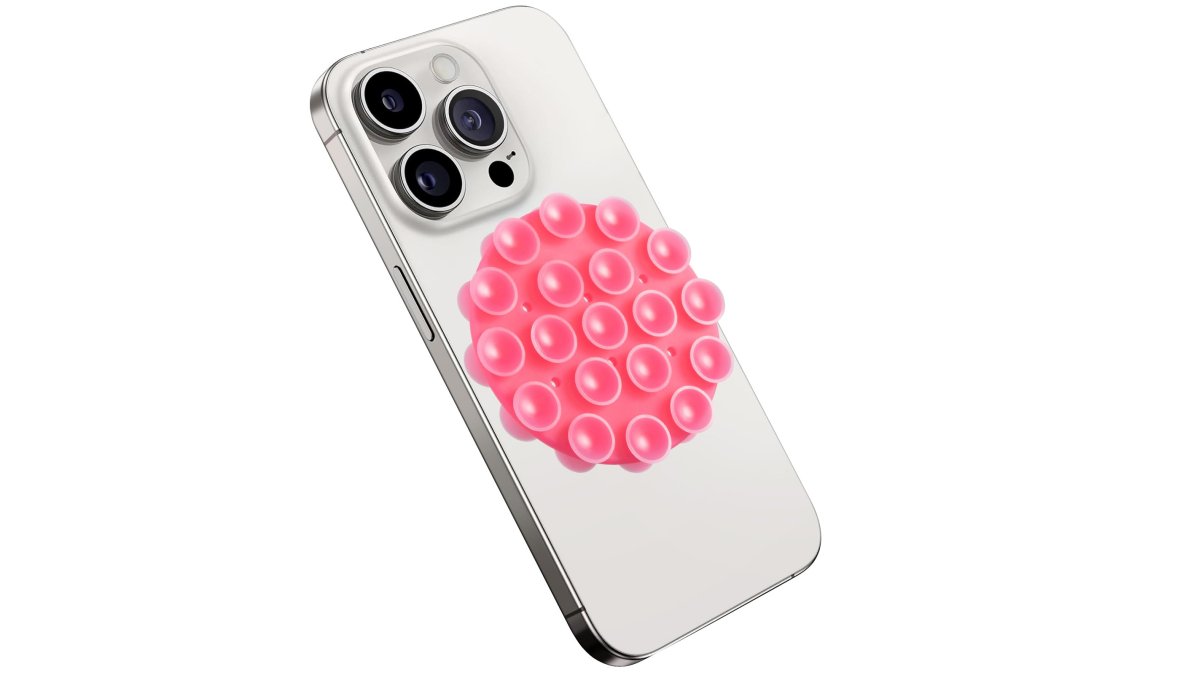
3. Magnetic Phone Mount: Hands-Free Everywhere
The Magnetic Phone Mount ($14.99) uses a double-sided suction cup and strong magnet to hold your phone at eye level on a desk, mirror, or kitchen backsplash.
It's the cheapest fix on the list and arguably the most useful: video calls stop requiring a stack of books, navigation stops requiring a hand, and quick clips stop requiring a tripod.
The limitation: suction cups lose grip on textured or dusty surfaces, so clean the surface and re-seat every few weeks.
4. Magnetic Selfie Light and Camera Remote: Faster Content and Calls
Two products solve one problem: getting a usable shot without a second person. The Magnetic Selfie Light ($29.99) is MagSafe-compatible with six lighting modes and a sticky ring; the Social Media Camera Remote ($19.99) triggers photos and recording from across the room.
Together they cut the retake loop: light the shot, frame it, and trigger it without walking back to the phone.
For product clips, livestreams, or dim-room video calls, this pairing replaces a ring light and tripod. If you don't create content, skip both.
5. Airtight Storage Bins: Cut the Sunday Pantry Hunt
The Airtight Storage Bins ($49.99) are clear, stackable, and seal shut, so you see what's inside without opening anything.

Savings show up in meal prep and the weekly grocery run: labeled, visible containers stop duplicate purchases and digging through half-open bags, and the airtight seal keeps grains and dried goods dry long term.
It's an organizing tool, not an automation, it saves time only if you commit to the system once.
6. UV Toothbrush Sanitizer: Hygiene on Autopilot
The UV Toothbrush Sanitizer ($29.99) stores and sanitizes your toothbrush in one compact, travel-friendly unit that works at home or in a bag.

The value is routine compression: your toothbrush gets a hygienic home instead of a cup on the counter, and the sanitizing cycle runs unattended, one less thing to manage in a shared bathroom.
How to Set Up a Smart Home Office in One Afternoon
A smart home office is not a pile of gadgets but a few automated routines that run without you. This two-hour setup creates a workspace that turns on when you sit down, adjusts during calls, and shuts down when you leave, without opening an app.
Before you start: pick one ecosystem
The biggest mistake busy people make is buying four brands that don't talk to each other. Choose one path and stay on it:
- Matter and Thread (the current standard). Matter is the cross-brand standard backed by Amazon, Apple, Google, and Samsung; a Matter-certified device works with Apple Home, Google Home, Amazon Alexa, and Samsung SmartThings. Buy Matter-certified in 2026, it's the closest thing to future-proofing.
- A single-brand ecosystem. If you already own an Echo or Nest Hub, staying in-brand is simpler and cheaper, at the cost of flexibility later.
Avoid older Zigbee and Z-Wave devices that need a proprietary hub and don't support Matter, they still work but lock you in.
The two-hour build order
Work in this sequence. Each step depends on the one before it.
- Router first (15 minutes). Confirm 2.4 GHz is enabled, set a strong password, and turn on the guest network for smart devices. Everything else depends on this.
- Smart plugs (15 minutes). Plugs are the cheapest way to automate existing "dumb" devices, a desk lamp, monitor, space heater, or coffee maker. A two-pack of Matter-certified plugs runs $20 to $30. Name each in the app ("Desk Lamp," not "Plug 1") so voice commands work later.
- Smart lighting (20 minutes). Replace the desk lamp bulb with a smart bulb or use the plug from step 2. Set two scenes: Focus (bright, cool white, ~4000K) and Wind Down (warm, dim, ~2700K). Color temperature matters more than color for productivity.
- Smart thermostat (20 minutes). Set a schedule that drops the temperature during your workday and raises it 30 minutes before you finish. It's the highest-ROI smart home purchase for most households because it runs unattended.
- Voice assistant (15 minutes). Place a speaker or display within reach of the desk. Set up three routines: "Good morning" (lights on, thermostat to work temperature, calendar readout), "Focus time" (notifications off, Focus scene on), and "Goodnight" (lights off, thermostat down, plugs off).
- Security and entry (20 minutes). Add a video doorbell or indoor camera pointed at the entry, not the desk. With a smart lock, set temporary codes for recurring visitors, cleaner, dog walker, contractor, instead of sharing your master code.
- Leak and safety sensors (15 minutes). Place a water leak sensor under the sink and near the water heater. These are the least glamorous smart home devices and the ones that save the most money: a slow leak found in an hour is a mop, one found in a week is a contractor.
What you'll need: a router you can log into, one free outlet per plug, a phone with the ecosystem app, and about two hours.
Expected result: a workspace that responds to your presence and voice, with no app-opening during the workday.
Room-by-room shortcuts for the rest of the house
You don't need to automate the whole house on day one. Highest-value additions once the office runs:
- Bedroom: A smart plug on a lamp plus a wake-up routine that fades the light on 15 minutes before your alarm. No new hardware beyond the plug.
- Kitchen: A smart display for timers and recipes plus a leak sensor under the sink. Skip the smart refrigerator, the ROI isn't there yet.
- Entry: A smart lock plus a video doorbell eliminates the "did I lock the door?" loop, check from your phone in five seconds.
- Laundry or utility room: A leak sensor and a smart plug on the iron or space heater so it cannot be left on.
The three failure modes to expect
- A device will not pair. Nine times out of ten it is the 2.4 GHz issue. Check that first.
- A routine fires at the wrong time. Time zones and daylight saving are the usual culprits, verify the hub's location setting, not just your phone's app.
- Two ecosystems fight over the same device. Setting up a device in both Apple Home and Google Home causes conflicting commands. Pick one as primary and use the other only for voice.
Consumer guidance on smart home device safety and recalls
Cost-Benefit: What an Hour of Your Time Is Worth
You don't need the full set. The Auto Mouse Mover and Magnetic Phone Mount cost under $40 together.
Privacy and Maintenance for Non-Techies
Most smart home guides treat privacy as an afterthought, but the devices that save the most time, voice assistants, cameras, locks, thermostats, also collect the most data about your household. Here's the set-it-and-forget-it security guide the rest of the internet skips.
The three settings that do the most work
You don't need to become a network engineer, just change three things on day one:
- Turn on two-factor authentication (2FA) on every smart home account. This is the single highest-value action: if a password leaks, 2FA stops someone from unlocking your front door or watching your camera feed. Use an authenticator app rather than SMS where offered, since SMS codes can be intercepted through SIM-swap attacks.
- Change the default router password and enable WPA3 (or WPA2 if older). Every smart device sits behind that router, and a weak router password undoes every other privacy setting.
- Put smart devices on a separate Wi-Fi network. Most modern routers ship with a guest network, move cameras, plugs, and speakers onto it. If one device is compromised, it can't reach your laptop, file server, or work accounts.
That's roughly 20 minutes of work, once.
What each device type actually collects
People often worry about the wrong device. A plain-language breakdown:
- Smart speakers and displays: They listen for a wake word locally, then send command audio to the cloud. Review and delete voice recordings in the assistant's privacy dashboard, and use the physical mute button when not in use.
- Indoor cameras: Assume anything in frame is recorded and stored, often in the cloud. Point cameras away from workspaces, beds, and screens showing client work. Enable end-to-end encryption if offered, and check for a physical privacy shutter.
- Smart locks: The highest-stakes device in the house. Enable 2FA, disable remote unlock when not traveling, set temporary codes for guests instead of sharing your master code, and review the access log weekly, it takes 30 seconds.
- Smart thermostats and plugs: These mostly collect occupancy and usage patterns. Privacy risk is low, but account risk isn't, someone in your thermostat account can see when you're home. Same 2FA rule applies.
Maintenance that actually matters
Busy users don't need a maintenance calendar, just a short list of what breaks and how to fix it in under five minutes.
- Device drops off Wi-Fi. Unplug it, wait 30 seconds, plug it back in. If it still fails, check whether the router's 2.4 GHz band is on, most smart plugs, locks, and cameras only support 2.4 GHz, not 5 GHz. This resolves most "my smart device won't connect" calls.
- Voice assistant stops responding. Check the mute button, then the app for a firmware update, then reboot the router, in that order.
- Camera shows offline but the light is on. The device is powered but not connected. Re-run the pairing flow from the app; don't factory reset unless pairing fails twice.
- Smart lock battery warning. Replace batteries at the first alert, not the second, a dead lock during a workday is the most expensive five minutes of your month.
The one habit that prevents most problems
Keep one note, paper or phone, with the account email, app name, and 2FA method for each device. When something breaks six months from now, you won't be resetting passwords while a client waits on a call. That note is the entire maintenance system most busy households need.
Federal Trade Commission guidance on securing smart home devices
CISA guidance on securing the Internet of Things
Frequently Asked Questions
What are the best smart home solutions for automating daily chores?
Start with devices that remove a repeated manual step. An Auto Mouse Mover ($24.99) keeps your computer awake during long tasks so you are not re-logging in. An Automatic Stirring Cup ($29.99) mixes your coffee without a spoon. Airtight Storage Bins ($49.99) end the pantry search before every meal. None of these need a hub, an app account, or a subscription, which is why they suit busy households better than a full automation system you have to configure and maintain.
How can smart home technology improve productivity for remote workers?
The gains come from removing small interruptions, not from buying the most devices. A magnetic phone mount ($14.99) holds your phone at eye level for calls and navigation so your hands stay free. A magnetic selfie light ($29.99) can improve lighting for video calls. A social media camera remote ($19.99) lets you record hands-free.
What are the most reliable smart home devices for beginners?
Devices that work out of the box with no network setup are the safest first buys. The Auto Mouse Mover is plug-and-use. The Automatic Stirring Cup runs on a rechargeable battery with a single button. The UV Toothbrush Sanitizer ($29.99) needs no pairing at all. If you do want app control, check that the device uses Wi-Fi rather than a proprietary hub, because hub-based systems add a point of failure and another app to manage.
Are smart home devices worth the investment for busy families?
Run the math on time, not novelty. An Auto Mouse Mover ($24.99) can help keep your computer awake during long tasks. A stirring cup ($29.99) can simplify your morning routine. The Fly Repellent Fan ($24.99) can help keep the kitchen clear during meals without sprays. Consider how each device might simplify your daily tasks.
How do I choose smart home solutions that work together?
Prioritize devices that do not need to talk to each other. The Velora picks here are self-contained: a mouse mover, a stirring cup, storage bins, a sanitizer, a fan, a phone mount, and a camera remote. Each one solves its own problem with no hub, no account, and no compatibility check. That approach avoids the interoperability headaches that come with mixing brands, protocols, and firmware updates across a larger ecosystem.