
Table of Contents
- Quick Comparison: Must-Have Tech for Modern Living
- Productivity Gadgets for Professionals That Earn Their Desk Space
- Best Tech for Morning Routine Optimization
- Smart Home Automation Essentials That Do Not Require a Hub
- Entertainment Tech for Modern Living: The $79.99 Portable Projector
- Privacy, Interoperability, and E-Waste: What Most Roundups Skip
- How to Pick Must-Have Tech for Modern Living Without Wasting Money
- Conclusion
- Frequently Asked Questions
Last Updated: September 10, 2026
Quick Comparison: Must-Have Tech for Modern Living
The best must-have tech for modern living solves a specific daily annoyance instead of adding another app to manage. Velora curates these finds so you skip the endless scrolling, and this list sticks to seven picks that earn their place on a desk, a counter, or a nightstand.
| Product | Price | What It Fixes | Best For |
|---|---|---|---|
| Virtual Mouse | $24.99 | Screen lockouts during long tasks | Remote workers, downloaders |
| Magnetic Phone Mount | $14.99 | Propping your phone for calls and video | Hands-free filming, video calls |
| UV Toothbrush Sanitizer | $29.99 | Germ buildup on bristles | Travelers, shared bathrooms |
| Filtered Showerhead | $68.70 | Harsh, drying shower water | Dry skin, hard water homes |
| Fly Repellent Fan | $24.99 | Flies circling the kitchen | Open kitchens, patios |
| Airtight Storage Bins | $49.99 | Stale snacks and cluttered pantries | Meal preppers, snack hoarders |
| Portable Projector | $79.99 | Tiny screens for movie nights | Renters, backyard hosting |
Below, we break down what each one actually does, where it falls short, and who should skip it.

Productivity Gadgets for Professionals That Earn Their Desk Space
Productivity gadgets for professionals only matter if they remove friction you hit every single day. Two stand out because they fix problems you have probably worked around for years without questioning them.
Virtual Mouse: The $24.99 Fix for Screen Lockouts
The Virtual Mouse is a small USB device that nudges your cursor just enough to stop your computer from sleeping or locking. Plug it in, and it starts working immediately, no software to configure.
That matters more than it sounds. Long downloads, render jobs, and remote sessions all die when your screen times out. This little box keeps the session alive.
- Plug-and-play USB connection, no drivers
- Simulates subtle cursor movement automatically
- Compact footprint at roughly 13 by 12 centimeters
- Available in black or white
Pros: Genuinely set-and-forget; cheap fix for an annoying problem. Cons: One job only; not useful if you already manage power settings well.
Magnetic Phone Mount: Hands-Free Video and Calls
The Magnetic Suction Cup Phone Mount sticks to smooth surfaces using 15 small suction cups rather than adhesive. Move it from a mirror to a glass cabinet to a car window without leaving residue.
If you film content, take video calls, or follow recipes hands-free, this replaces the tripod you keep forgetting to bring.
Pros: No adhesive, repositionable, holds firmly on clean smooth surfaces. Cons: Won't stick to textured or dusty surfaces, so it's not a universal mount.
Best Tech for Morning Routine Optimization
The best tech for morning routine optimization works while you're still half asleep. Neither of these requires an app, a schedule, or a single tap.
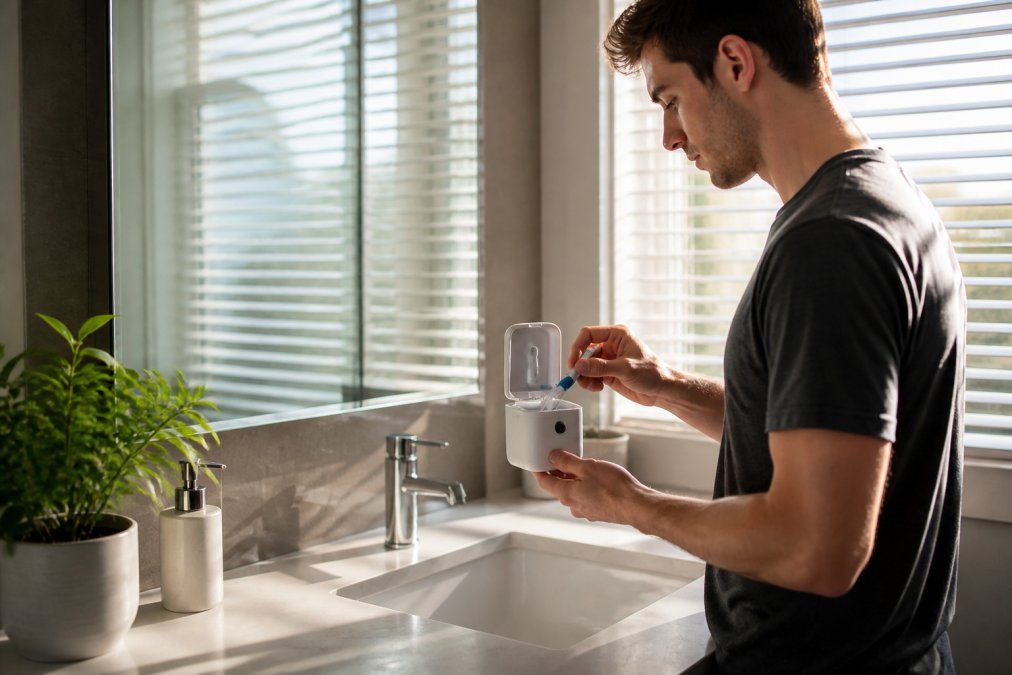
UV Toothbrush Sanitizer: Cleaner Starts Before Coffee
The UV Toothbrush Sanitizer uses UV light to clean your toothbrush between uses, and the brand states it eliminates up to 99.9% of germs. It holds most toothbrush sizes and includes a spot for toothpaste, so your counter stays tidier too.

Bathrooms are humid, and a wet brush sitting in a cup is not the cleanest object in your home. This gives it a dedicated, ventilated home.
Pros: Compact, travel-friendly, doubles as storage. Cons: Needs charging or power, and it's an extra item to pack if you travel light.
Filtered Showerhead: A Better First Five Minutes
The Showerhead with Built-In Filter is a 6-inch rain showerhead with a built-in filter, made from ABS plastic with an electroplated finish. The filter targets the sediment and impurities that come through older pipes.
If your skin feels tight after showering or your hair looks dull no matter what you use, the water itself is a reasonable suspect. Installing a filtered head takes a few minutes with no plumbing experience.
Pros: Easy swap, rain-style flow, filter included. Cons: Filters need periodic replacement, and it won't fix genuinely hard water on its own.
Smart Home Automation Essentials That Do Not Require a Hub
Smart home automation essentials usually mean hubs, apps, and accounts. These two skip all of that, which is exactly why they stay in rotation.
Fly Repellent Fan: Chemical-Free Kitchen Comfort
The Fly Repellent Fan circulates air while creating a gentle repellent effect that keeps flies away from food. No sprays, no traps, no smell. It works in kitchens, dining areas, patios, and offices.
For anyone who cooks with the windows open, this is the least annoying solution available.
Pros: Chemical-free, doubles as a cooling fan, works indoors and out. Cons: Effectiveness depends on placement near the food or doorway.
Airtight Storage Bins: Pantry Order Without an App
The Clear Airtight Storage Bins use an airtight, moisture-proof seal to keep grains, nuts, and dried fruit fresh longer. The clear body means you see what's inside without opening anything.
Chips going stale and flour clumping are storage problems, not food problems. Fix the container and both stop.
Pros: Visible contents, moisture-proof seal, stackable. Cons: Only worth it if you actually buy dry goods in bulk.
Entertainment Tech for Modern Living: The $79.99 Portable Projector
Entertainment tech is where most "modern living" roundups go wrong. They list a soundbar, a streaming stick, and a TV, then call it a day. The real decision is simpler: do you want a fixed screen or a screen that moves with you? That single question determines everything else.
Fixed Screens vs. Portable Screens
A television is a commitment. It needs a wall, a stand, a power outlet in the right place, and a landlord who allows mounting. A portable projector trades image quality for flexibility. It lives in a closet, comes out for movie night, and disappears when you're done.
For renters, people in small apartments, and anyone who hosts outdoors, the portable projector wins on logistics alone. For a dedicated media room, a TV still wins on brightness, contrast, and the fact that you never have to dim the lights.
The $79.99 Portable Projector: What You Actually Get
The Portable Small Projector throws a 720p image onto any blank wall for $79.99. It's small enough to store in a closet and light enough to carry to a friend's backyard.

Here's what that price buys and what it doesn't:
- Resolution: 720p native. Fine for casual viewing, noticeably soft on text-heavy content like sports tickers or subtitles.
- Brightness: Entry-level. You need a dark or heavily dimmed room. Ambient light washes the image out fast.
- Setup: Point it at a wall, adjust focus, done. No mounting, no drilling, no cable runs.
- Audio: Built-in speaker is adequate for a bedroom, weak for a group. Plan on external audio for anything bigger than two people.
- Inputs: Standard HDMI and USB connections cover streaming sticks, laptops, and game consoles.
Who Should Buy It, and Who Should Skip It
Buy it if: you rent, you move often, you want a big screen without a big commitment, or you host outdoor movie nights in the warmer months.
Skip it if: you watch sports during the day, you need crisp text on screen, or you want a permanent home theater setup. In those cases, put the $79.99 toward a budget television instead.
The Rest of the Entertainment Stack
A projector is only one piece. The other two categories worth considering:
- Streaming devices: A streaming stick or box turns any projector or older TV into a smart device. They're cheap, they update independently of the screen, and they're the easiest way to avoid being locked into one manufacturer's app store.
- Audio: Built-in speakers on projectors and TVs are almost always the weak link. A compact soundbar or a pair of powered bookshelf speakers fixes dialogue clarity more than any picture upgrade will.
Pros: Genuinely portable, affordable, no installation. Cons: 720p resolution, needs a dark room, weak built-in audio.
Privacy, Interoperability, and E-Waste: What Most Roundups Skip
Most buying guides stop at features and price. Three things separate tech that lasts from tech that ends up in a drawer, and they matter more than any spec sheet.
Privacy: Check Before You Connect
Every connected device is a small computer with a microphone, a camera, a sensor, or a network connection. Budget gadgets often ship with vague data policies, and the app is frequently the real product.
Before you connect anything to your home network, do three things:
- Read the app's permission requests. A light bulb does not need access to your contacts or location. If it asks, that's a signal.
- Check whether the device works without an account. Some do. Many don't. If it requires an account, your usage data is going somewhere.
- Look for a published privacy policy. No policy is worse than a bad one.
The FTC's guidance on connected device privacy and security is a plain-language starting point if you want to understand what companies are expected to disclose.
Interoperability: The Matter and Thread Question
The single biggest frustration in a connected home is fragmentation. You buy a smart plug from one brand, a bulb from another, and a hub from a third, and none of them talk to each other. You end up with four apps and no automation.
Matter is a cross-brand standard designed to fix that. A Matter-certified device is supposed to work with any Matter-certified hub or app, regardless of who made it. Thread is a related networking protocol that lets low-power devices form their own mesh instead of relying on Wi-Fi.
The practical rule: if a device is Matter-certified, it will likely still work with your setup in three years. If it isn't, you're betting on one company's app staying alive.
The Connectivity Standards Alliance Matter overview explains the standard in detail, including which device categories are covered.
E-Waste: Where It Goes When It Breaks
Cheap electronics get replaced fast, and most of them end up in a landfill. That's a problem because consumer electronics contain metals, plastics, and sometimes hazardous materials that don't belong in a trash bin.
The EPA guidance on electronic waste outlines how to recycle rather than toss old devices, including retailer take-back programs and municipal collection events.
Three habits that cut e-waste without much effort:
- Buy fewer things. One device that does a job well beats three that do it poorly.
- Check for repairability. Replaceable batteries and available parts extend a device's life by years.
- Recycle properly. Best Buy, Staples, and many municipal programs accept old electronics for free.
The Combined Test
Before any purchase, run it through all three filters:
- Does the app ask for more than it needs?
- Is it Matter-certified, or locked to one brand?
- Can you recycle it when it dies?
If a device fails two of the three, it's not a must-have. It's a future drawer resident.
How to Pick Must-Have Tech for Modern Living Without Wasting Money
Use this checklist before you buy anything, whether it's on this list or not:
- Name the specific daily problem it solves, in one sentence
- Confirm it works without a subscription or mandatory app
- Check whether it needs a hub, a specific phone, or a specific OS
- Read the return policy before ordering
- Verify the price against the exact model, not a similar one
- Ask where it goes when it breaks
A useful filter: if you can't explain the problem it fixes to a friend in one breath, you're buying a novelty. The FTC's guidance on shopping and return policies is worth a look if you want to understand your rights before a gadget purchase goes wrong.
Conclusion
The hardest part of upgrading your daily routine isn't finding gadgets, it's finding ones that survive past the first week. Velora curates trending, affordable products across home, tech, and lifestyle so you skip the endless searching and get straight to the useful stuff. Browse the full range and pick the one problem you want solved first. Get started with Velora and build a setup that actually earns its space.
Frequently Asked Questions
What are the must-have tech gadgets for a modern home in 2026?
The strongest picks solve a daily friction point rather than adding another app. A virtual mouse mover ($24.99) keeps your work laptop awake during long downloads. A filtered showerhead ($68.70) improves the first five minutes of your day. A portable 720p projector ($79.99) turns any blank wall into a movie screen. Airtight storage bins ($49.99) keep pantry staples fresh. Each one works without a subscription, and none require a smart home hub to function.
How can smart home devices simplify a morning routine?
The useful ones remove a step you currently do by hand. A UV toothbrush sanitizer ($29.99) cleans your brush while you eat breakfast, so you are not rinsing it manually. A filtered showerhead installs in minutes and needs no wiring. Airtight storage bins keep breakfast staples organized so you are not digging through cabinets. None of these need Wi-Fi or an account, which means fewer firmware updates and less setup time before your coffee is ready.
Do I need a smart home hub to use these devices?
No. Every pick here runs independently. The virtual mouse mover plugs into USB. The toothbrush sanitizer uses UV light with no app. The projector connects through its included cables and remote. This matters because hub-dependent devices add setup time, another login, and one more thing that breaks when the hub loses connectivity. If you later want voice-activated control, you can add a hub, but these gadgets work fine without one.
What should I check before buying tech for modern living?
Check four things: whether it works without a subscription, whether it needs an app or account, what the return window is, and whether replacement parts exist. A $79.99 projector is worth verifying before purchase. Also confirm the device uses standard connections like USB or USB-C, so you are not locked into a proprietary cable that becomes hard to replace two years from now.
How do I keep e-waste down when upgrading my home tech?
Buy fewer devices that do more, and pick ones with standard power and connection types. A USB-powered gadget can be reused with any adapter you already own. Before replacing anything, check whether a firmware update or a new cable solves the problem. When you do retire a device, use retailer or municipal e-waste drop-off programs rather than curbside trash, since lithium batteries and circuit boards need separate handling in most states.